TOP Free Proxy List



What Is a Proxy Server? A Complete Guide to Proxy Types
Published 14/08/2026 · Updated 11/10/2026
If you've ever filtered a proxy list by "protocol" or "anonymity level" and wondered what any of it actually means, this guide is for you. A proxy server is one of the simplest and oldest tools in networking, but the terminology around it — HTTP, HTTPS, SOCKS4, SOCKS5, elite, transparent — can look intimidating at first glance. By the end of this article you'll understand exactly what a proxy does, how the different types differ, how a proxy compares to a VPN, and which one fits a given task.
What is a proxy server?
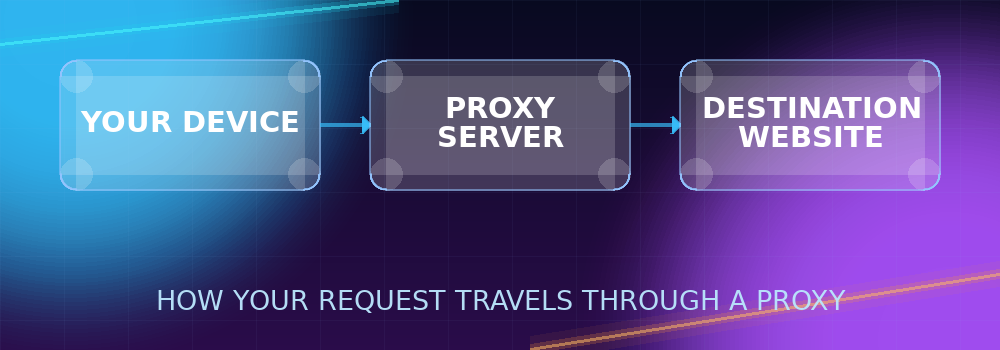
A proxy server is a computer that sits between your device and the internet. Instead of connecting directly to a website, you connect to the proxy, and the proxy connects to the website on your behalf. The response comes back through the same path: website to proxy, proxy to you.
The practical effect of this is that the website you're visiting sees the proxy's IP address and location, not yours. That's the whole mechanism behind almost everything people use proxies for — appearing to browse from a different location, distributing requests across many IP addresses, or adding a layer between your device and the sites you visit. It sounds simple because it is: a proxy doesn't need to understand or modify your traffic to be useful, it just needs to relay it faithfully while presenting a different address to the outside world.
Proxies have existed in some form since the earliest days of corporate and university networks, originally used for caching frequently-requested pages and for content filtering. The IP-masking side effect — that the destination only sees the proxy's address — is what made proxies useful for the much wider range of tasks people use them for today.
How a proxy server actually works
Picture a normal request without a proxy: your device asks a website for a page, and the website replies straight back to your device's IP address. Now add a proxy into that chain. Your device sends the same request, but addressed to the proxy instead. The proxy opens its own connection to the website, forwards your request, receives the response, and relays it back to you. From the website's point of view, the request originated at the proxy — it has no direct knowledge of your device at all.
This single mechanism is reused for a surprising number of purposes: geographic testing (seeing how a site looks from another country), distributing traffic across many IPs (common in web scraping), basic anonymity, and bypassing IP-based rate limits. What changes between use cases isn't the mechanism — it's which type of proxy you use and how you configure it, which is where protocols and anonymity levels come in.
It's worth being precise about what a proxy does and doesn't do. A proxy changes what IP address the destination sees. On its own, a plain HTTP proxy doesn't necessarily encrypt your traffic, doesn't hide your activity from your own internet provider, and doesn't protect you from browser fingerprinting techniques that don't rely on IP address at all (cookies, browser/device characteristics, and so on). It's a specific, narrow tool — extremely useful for what it does, but not a general-purpose "make me invisible" switch.
The main types of proxies, by protocol
"Protocol" refers to the rules the proxy uses to communicate. This matters because not every proxy protocol supports every kind of traffic, and picking the wrong one is the most common reason a proxy "doesn't work" for a particular task.
HTTP proxies
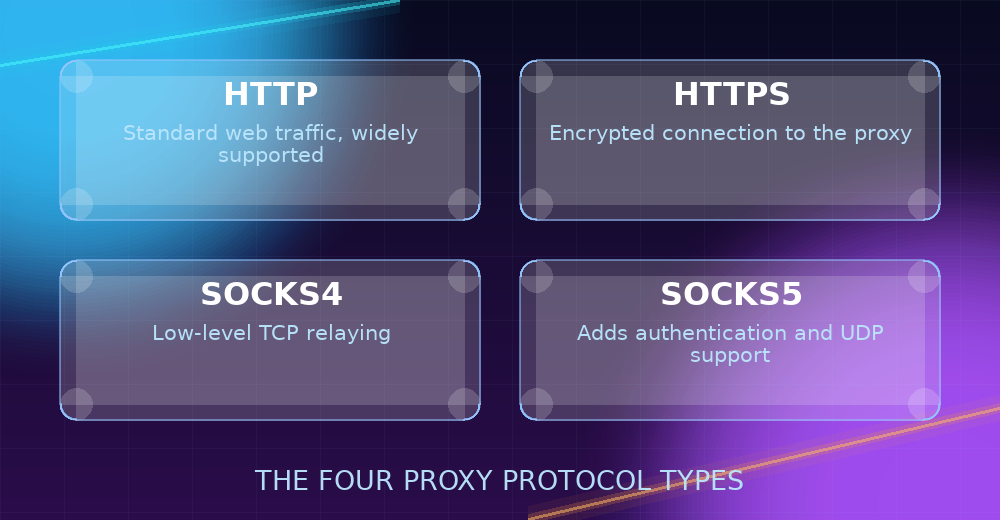
HTTP proxies are built specifically for web traffic — they understand HTTP requests and responses and are the most widely supported proxy type across browsers, scraping libraries, and automation tools. If a piece of software has a simple "proxy" setting with no protocol picker, it's almost always expecting an HTTP proxy. The tradeoff is that an HTTP proxy's own connection to you isn't necessarily encrypted, so it's not the right choice for anything sensitive. HTTP proxies are the best starting point for general browsing, checking geo-specific content, and most scraping tools, purely because of how broadly supported they are.
HTTPS proxies
HTTPS proxies work the same way as HTTP proxies but add TLS encryption on the connection between your device and the proxy itself. That matters for the leg of the journey between you and the proxy server — it doesn't change how the proxy talks to the destination site, but it does mean the traffic in that first hop can't be casually read by anyone else on the network. Most HTTP proxies that support the CONNECT method can also tunnel HTTPS destination traffic, but a proxy explicitly labeled "HTTPS" on a list like this one has been confirmed to handle that tunnel correctly, which is a useful signal on its own.
SOCKS4 proxies
SOCKS operates at a lower level than HTTP/HTTPS proxies — instead of understanding web requests specifically, it simply relays raw TCP connections. That makes SOCKS4 useful for applications that aren't browsers: FTP clients, chat applications, or any tool that needs to open a generic TCP connection through a proxy rather than just fetch a web page. The tradeoff is that SOCKS4 has no built-in authentication and doesn't support UDP traffic, so treat the proxy itself as untrusted infrastructure rather than a private tunnel.
SOCKS5 proxies
SOCKS5 is the newer, more capable version of SOCKS4: it adds optional username/password authentication and support for UDP traffic (used by things like DNS lookups, some game servers, and certain streaming/VoIP protocols). If an application specifically asks for a "SOCKS5" proxy rather than just "SOCKS," it's because it needs one of those extra capabilities — otherwise SOCKS4 does the same basic job.
Types of proxies by anonymity level
Separately from protocol, every proxy also has an "anonymity level" — how much information it reveals about the fact that a proxy is being used at all:
- Elite (high anonymity): The destination site sees only the proxy's IP address, with no headers or other signals indicating a proxy is in use.
- Anonymous: The destination site can tell a proxy is being used (via certain headers) but doesn't learn your real IP address.
- Transparent: The proxy passes your real IP address along anyway, usually via an X-Forwarded-For header — useful for caching or content filtering, not for hiding your identity.
Picking the right anonymity level depends entirely on the task: transparent proxies are fine when hiding your identity isn't the point (for example, testing your own site's behavior), while elite proxies matter when you specifically don't want the destination to know a proxy is involved at all, such as certain scraping or geo-testing scenarios where sites actively treat known-proxy traffic differently.
Proxy vs. VPN vs. Tor: how they compare
Proxies are often mentioned in the same breath as VPNs and Tor, but the three work quite differently. A VPN encrypts and routes all traffic from your device at the operating-system level through a single provider's server — it's an all-or-nothing, device-wide tunnel meant for continuous use. A proxy, by contrast, is usually configured per-application (a browser, for instance) and doesn't necessarily encrypt anything unless it's specifically an HTTPS or authenticated SOCKS5 proxy. Tor routes traffic through multiple independently-operated relays with layered encryption, prioritizing anonymity over speed, and is a different tool entirely from either a proxy or a VPN.
In practice: reach for a VPN when you want everything on a device protected continuously; reach for a proxy when you need a quick, task-specific, or per-application IP change without installing anything system-wide; reach for Tor when anonymity itself — not just IP masking — is the primary goal.
Free vs. paid proxies
Proxy lists like this one aggregate free proxies from public sources — servers that anyone can use at no cost, but with no guarantee of uptime, speed, or how long any individual entry will stay online. Paid proxy services offer more consistent uptime and dedicated bandwidth in exchange for a subscription. Which one makes sense depends on the task; we cover that tradeoff in detail in Free vs. Paid Proxies: Which One Should You Choose?
Common use cases for proxies
A few of the most common reasons people reach for a proxy:
- Geo-testing: Checking how a website, price, or search result looks from a different country.
- Web scraping: Distributing requests across multiple IPs so a single address doesn't get rate-limited or blocked.
- Basic anonymity: Hiding your IP address from the sites you visit for everyday browsing.
- Automation and testing: Running the same task from multiple simulated locations or identities.
- Bypassing IP-based rate limits: Rotating source IPs when a single address is hitting a request cap on an API or service.
Getting started
The free proxy list on this site is refreshed automatically every 15 minutes and can be filtered by exactly the protocol and anonymity level covered above. Once you've picked a proxy, it's worth confirming it actually works before relying on it — the Proxy Checker connects through any proxy you paste in and reports back whether it's alive, along with its real exit IP, country, and city. For a hands-on walkthrough of actually configuring one on your device, see How to Set Up a Proxy on PC and Mobile.